 OptiPin
Medications & Protocols
How do I add a custom or generic medication not in the built-in list?
How do I create a titration protocol - for example, 4 weeks on / 2 weeks off?
- Add the medication from the Medications tab.
- Open the medication detail and tap the Schedule tab.
- Set a start date and an end date for the first "on" block.
- For 5-on / 2-off or similar patterns, use a Custom Repeat pattern and configure the active and rest days.
A dedicated tutorial for titration and cycle schedules is being added in an upcoming update.
I started a new bottle - do I need to recreate the medication?
Can I group vitamins and supplements with my other medications?
The dose I see when logging doesn't match the default shown for my medication. Why?
The classic symptom: the medication screen shows one dose - say 2 mg - but when you go to log a dose the form pre-fills a different amount, like 4 mg (or the other way round). That's not a glitch; two different numbers are in play:
- Current dose on the medication screen is what's scheduled right now. While a titration or cycle schedule (a "temp schedule") is active, that's the titration amount for today - not the default strength you originally set.
- The log-dose form pre-fills whatever is scheduled for the date you're logging. On a day with nothing scheduled - an off-day between injections, or while cycled off - it falls back to your default strength instead.
So while a titration is running, the two can legitimately show different numbers. The pre-filled amount is always editable before you save - the app records exactly what you enter. If you don't want the override at all, remove the titration schedule and everything snaps back to your default:
- Open the Medications tab and tap the medication - one with an active titration shows a Titrating badge.
- In the schedule strip, find the highlighted Titration · Active card and tap it.
- In the Edit Temp Schedule sheet, tap Delete (top-right). Your default strength takes over straight away.
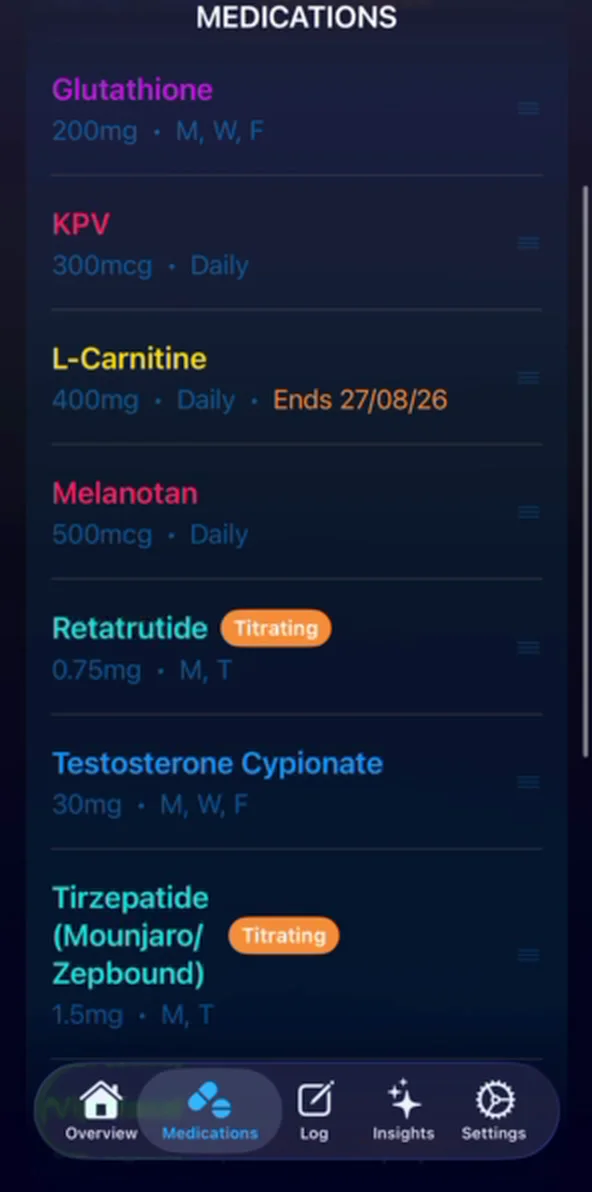
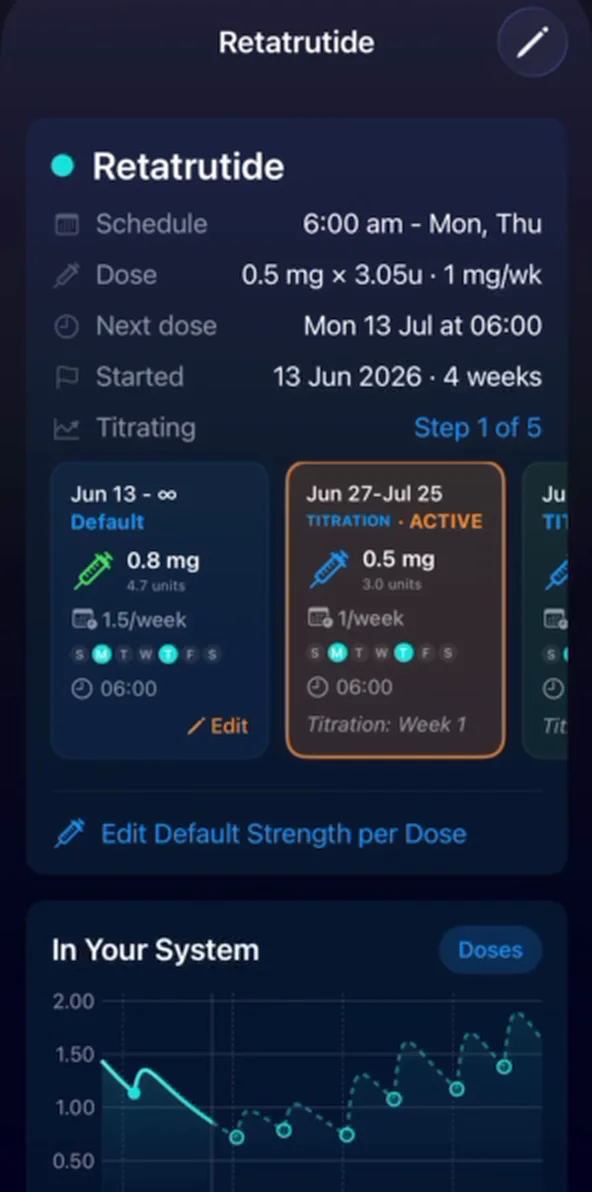
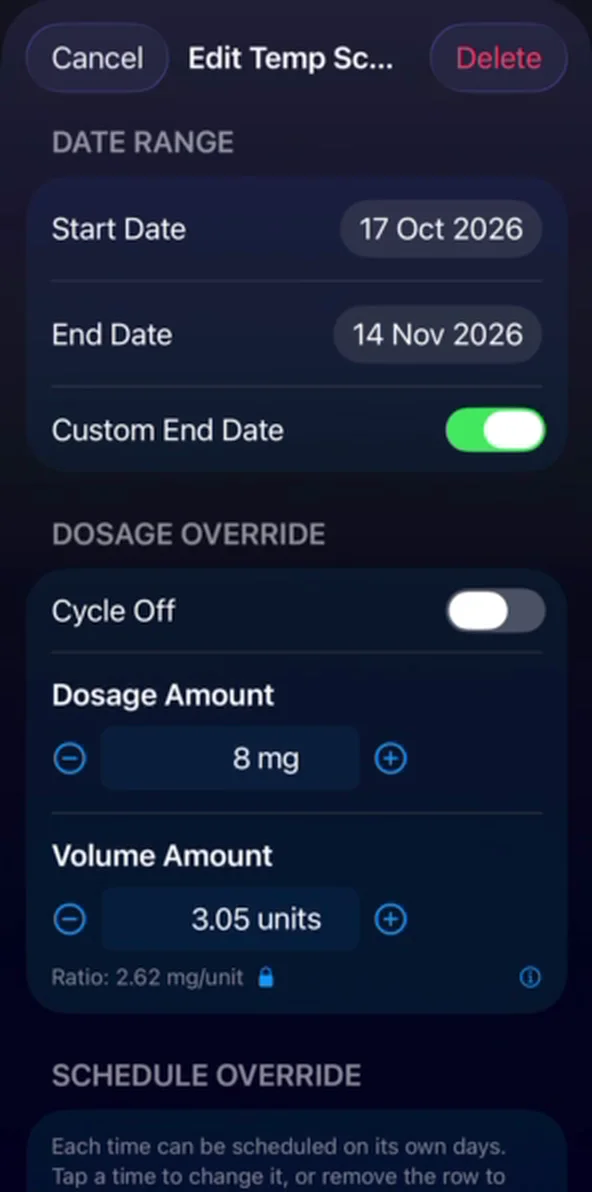
Only want to pause part of it? On that same sheet you can adjust the dates or the dosage instead of deleting the whole schedule.
Can I log two doses at different times - for example morning and night?
How do I track multiple compounds drawn into one syringe?
The compound I use isn't in the library - can you add it?
How does the reconstitution calculator work? The "units to draw" don't match my insulin syringe.
Open it from Insights → Tools & Resources → Calculators → Reconstitute Medication. The output is on an insulin syringe, and the key thing to understand is that how much water you reconstitute with is your choice - it isn't fixed - and that choice sets how many units you draw:
- Medication in Vial - the total in the vial (e.g. 500 mg NAD+).
- Desired Dose - how much you want per injection (e.g. 10 mg).
- Liquid Vol - how much bacteriostatic water you add. More water = lower concentration = more units to draw for the same dose; less water = fewer units.
- Units to Draw - the result, for the syringe size you pick (30, 50 or 100 unit - OptiPin defaults to 30 unit, the most common for peptides).
Worked example: a 500 mg vial dosed at 10 mg. Reconstitute with 2.5 mL and you draw 5 units on a 100-unit syringe; add 25 mL of water and you'd draw 50 units for the exact same 10 mg. Both are correct - a reading only "looks wrong" against another calculator that assumed a different water volume. Tap What do these mean? in the app for the same breakdown.

Entered the wrong water volume when you set the med up? Use Reconstitute New Bottle on the medication's detail screen to recalculate - there's no separate "maintain ratio" toggle to hunt for.
How do I track a blend (e.g. Test/Mast/Tren) and keep accurate level estimates?
Add each compound in the blend as its own medication rather than one combined "blend" entry. Each compound has its own half-life and curve, and keeping them separate is what lets OptiPin model the testosterone (and E2) estimates correctly - a single merged entry loses that.
To still log them in one tap, bundle them into a Group: Medications tab → ⋯ → Manage Groups → new group, add each compound, and enable Stack uses one injection site if you draw them together. Logging the group records all of them at once. (A group doesn't yet share one schedule, so dose changes are edited per compound.)
I'm stockpiling compounds for a future cycle - how do I add them without a schedule yet?
Where did the dosing / cycle info on the medication cards go?
Apple asked us to remove the built-in "common doses / typical cycle" reference from the medication cards, because in-app dosing guidance is treated as medical advice unless every value carries a citation. We're working to bring referenced dosing back for the compounds where that's possible.
In the meantime, the full dosing and cycle reference lives on the web, per compound, in the medication library and the peptide guides.
On a custom injectable, what do Strength and Volume mean - and why is it locked as "injectable"?
- Strength is the concentration of your solution - the amount per millilitre (e.g. 200 mg/mL). This is the same number the reconstitution calculator produces for peptides.
- Volume per injection is how much liquid you draw, in insulin-syringe units.
The two are linked: dose = Strength × Volume. Turn on Lock strength/volume ratio and the app keeps them in step (e.g. "5 units per mg"), so changing the dose at log time recomputes the units for you.
The route (Injectable, Oral, Topical, Nasal) is set by the custom type you choose at the top of the Add Medications list, and it's fixed once created - the detail screen shows it as read-only. If a med came out as the wrong route, re-add it under the correct custom type and delete the first one.
Inventory & Stock
The app says I have 0 doses left, but I still have bottles in stock.
There are two common causes:
- A unit mismatch - your dose is set in one unit (e.g. mcg or IU) while your stock was entered in another (e.g. mg). Open Medications → [medication] → Inventory Tracking → Manage Inventory and make sure the dose unit and the bottle unit match.
- No schedule set - without a default schedule the app can't project how fast you'll use the stock, so the run-out can read as 0 or look wildly off. Set a schedule on the medication and it recalculates.
Once the units agree and a schedule exists, the doses-left count and run-out date come right.
How do I edit, delete, or reset my inventory?
Can I add stock by bottle count, in different vial sizes, or in IU?
Which vial does OptiPin use first?
Hormone Forecasting
Does the E2 estimation account for Primobolan or other compounds that lower estrogen?
The E2 model currently uses four inputs:
- Testosterone levels (exogenous + endogenous)
- Aromatase inhibitor (AI) use and dose
- Direct exogenous E2
- Your personal baseline from most recent bloodwork
There isn't yet a dedicated pharmacokinetic model for each compound that indirectly affects estrogen (like Primobolan) - the validated PK data needed to model those effects compound-by-compound isn't widely available.
Those compounds are still captured indirectly through your baseline, though. If you log bloodwork drawn while running a compound that suppresses your aromatization, the lower E2 - and the resulting testosterone-to-E2 ratio - is reflected in your most recent baseline, and every forecast calibrates from there. So as long as your bloodwork was taken under conditions similar to your current protocol, that compound's net effect on E2 is already factored in. If you have references for explicit per-compound modeling, please share them via support.
Does the forecast account for hCG or gonadotropins?
Not directly - but it's still accounted for through your bloodwork. hCG (and gonadotropins like Gonal-F or Menopur) raise your own testosterone by stimulating the testes, and that endogenous testosterone aromatizes to estradiol. That's often a major reason E2 runs high on an hCG-containing protocol.
The level forecast only models the testosterone you inject, so hCG's contribution to both testosterone and E2 doesn't appear as its own curve. Instead it's captured indirectly: estradiol is estimated as your aromatization factor × total testosterone + baseline, and when you log bloodwork drawn while on hCG, your measured testosterone-to-E2 relationship is baked into that personal aromatization factor and baseline. Every forecast then calibrates from there.
So as long as your most recent bloodwork was taken under a protocol similar to your current one, hCG's net effect on estradiol is already reflected in your numbers. If your bloodwork predates starting hCG - or your hCG dose has changed substantially since - log a fresh E2 panel to recalibrate.
Can I import blood work results to calibrate the forecasts?
Yes - three ways, all under Medications → Bloodwork History.
- Scan a photo or PDF (AI import). Tap Import Bloodwork → Scan a Lab Report, then Take Photo, Choose from Library, or Choose File or PDF. OptiPin reads the marker values into a Review Results screen where you check and edit each one before saving. (PDFs and clear screenshots give the best accuracy.)
- Apple Health Records. Import lab results your provider shares through Apple Health - coverage depends on your lab and provider.
- Enter values manually any time - testosterone, E2, hematocrit and other markers.
Your first scan each year is included with a subscription; after that, scanning uses inexpensive import credits you can buy from the App Store. However you add them, your labs personalise the forecasting model. To edit a saved panel later, tap it in Bloodwork History and tap the pencil (top right).
My estimate doesn't match my latest bloodwork - how do I recalibrate?
Open Testosterone Estimates, tap the gear icon (top right), and choose Re-calibrate from bloodwork. The "calibrated against" note at the bottom of the graph shows which labs are being used.
One important caveat: the model infers the effect of other compounds from the testosterone-to-E2 ratio in your most recent labs, so the estimate is only accurate while your current stack matches the stack you were on at that blood draw. If you've since added or dropped a compound, the forecast will re-align after your next set of labs.
On an aromatase inhibitor (anastrozole, exemestane)? AI use is a direct input to the E2 model, but for the estimate to reflect your response, log a blood panel drawn while you're on the AI - that anchors your personal aromatization factor so the E2 curve calibrates to how strongly it lowers your estrogen.
Logging & Gestures
Why was swipe-to-log removed? Can it come back?
My medication is showing up on days I don't expect - or not showing on days I do.
This almost always comes down to the schedule itself. Two things to check:
- Open the medication, go to the Schedule tab, and confirm the frequency is set to the interval you expect (e.g. "Every 7 days", specific weekdays, or "As Needed" - which won't generate daily prompts).
- Check whether the medication is on a titration or cycle schedule. An active titration schedule overrides the base schedule and can change which days the dose appears on. Open the Schedule Timeline and end or edit the titration schedule so the days line up with what you expect.
If both look correct but the issue persists, contact support with the medication name and your iOS version.
Where is the mood / side-effect tracker?
I logged my dose, but it still shows as due and the badge won't clear.
How do I skip a dose - for one day, or a whole cycle-off stretch?
For a single day: on the Overview screen, long-press the medication's "Today's Scheduled" card to open its quick-action menu, then tap Skip This Dose (or Skip All if several are due). The dose is marked skipped rather than missed, and if you skip it before its scheduled time, that day's reminder is cancelled too. Changed your mind? Long-press again and tap Unskip.
For a longer break - a week off, or a full cycle-off block: open the medication, tap Create Temp Schedule in the Schedule Timeline, and save it with Cycle Off on for the date range. No cards or reminders are generated for those days, and your normal schedule resumes automatically afterwards.
How do I turn off the celebration animation when I log a dose?
Open Settings → Customize → Celebrations. Under Dose Celebrations, choose Dose Logged Only - every routine dose then shows just a simple "Dose logged" banner, with no animation.
You can fine-tune the rest from the same screen: switch to Celebrate the Final Dose if you only want a flourish on the last dose of the day, change the Celebration Effects style, or turn off Haptic Feedback.
Injection Sites
Can you add a custom injection site?
I only see a few injection sites - where are the rest?
I can't find the "Vastus" injection sites anymore.
Subscription & Upcoming Features
Is there a lifetime subscription option?
Will there be home screen widgets?
How do I cancel my subscription or free trial - and can I get a refund?
Data, Backup & Sync
Is my data backed up, and can I use OptiPin on more than one device?
Can I import my dose history from a CSV or another app?
Yes. OptiPin has a built-in CSV importer at Settings → Data → Import Data (it's also offered when you first set up the app). Bring a CSV export from another tracker or your own spreadsheet.
Your file should have one row per dose with:
- a date column,
- a compound / medication name column,
- a dose amount column,
- a units column (mg, mcg, IU, mL) - optional but recommended,
- and a time of day column - optional.
If your date column already includes a time (a date-and-time value), OptiPin reads it automatically - you don't need a separate time column. Rows with a date only are imported at the start of that day.
After you pick the file you'll map your columns to those fields, then confirm each compound one at a time - matching it to a medication you already track or creating a new one on the spot. Nothing is added to your history until you confirm, so it's safe to preview first. If a date looks ambiguous (e.g. 03/04), OptiPin asks whether it's day-first or month-first.
Prefer to type rather than import? You can also enter past doses manually via the Log tab → Doses → Bulk Dose Logging. Stuck on a tricky export? Email it to us and we'll help.
My medications or history disappeared - how do I get them back?
OptiPin backs your data up automatically, so it can almost always be recovered. Go to Settings → Backup & Restore → Restore, choose your backup location (Local or iCloud), and pick a backup from before things went missing. Up to 30 recent backups are kept, so if the latest one doesn't look right, try an earlier one.
Restoring is additive - bringing back an older backup merges it in and won't wipe anything newer, so it's safe to try. As a belt-and-braces habit, also export a manual copy now and then via Settings → Export & Share.

What does OptiPin read from Apple Health, and does it write anything back?
OptiPin reads the metrics you allow - weight, sleep, heart rate, HRV, blood pressure, activity and more - and surfaces them alongside your medication usage and trends. It's read-only except for weight and blood pressure (and the heart rate saved with a BP reading), which it can write back to Health so your other apps stay in sync. Your doses, bloodwork and notes never leave OptiPin.
To turn it on, open Settings → Apple Health, grant access, and choose how far back to sync. If a metric isn't coming through, check iOS Settings → Apps → Health → Data Access & Devices → OptiPin for that category. Apple Health is the shared hub - your other apps have to write into Health for OptiPin to see their data; apps don't read each other directly.

Can I import my history from Shotsy or another tracker?
Can I export a report for my doctor?
Troubleshooting
The app crashes or won't open - what do I do?
- Update first. Make sure you're on the latest App Store version - most launch issues are fixed in the newest build.
- If you can still open it, back up now. Export a copy from Settings → Export & Share to protect your data. (If the app boots into Safe Mode or shows a "data could not be loaded" alert, use its Export Recovery Data option first.)
- Send us the crash log so we can pinpoint it: iOS Settings → Privacy & Security → Analytics & Improvements → Analytics Data, find the newest OptiPin-… entry, and share the
.ipsfile to support@vitaloom.xyz.

The app feels slow or laggy - can that be fixed?
Still need help?
If your question isn't answered above, reach out and we'll get back to you promptly.
Contact Support