⏱️ Tracking & Scheduling
Log it in seconds and never wonder whether you already took today’s dose.
“Fantastic to keep all my peptides and TRT in one place. The developer is extremely responsive.”
Dose logging
Never second-guess whether you took today’s shot. Log any medication in seconds – dose, time, site, notes – or back-fill one you forgot at the time it really happened. Long-press for one-tap logging.
Smart scheduling
However complex your protocol, the app keeps it straight – daily, weekly, EOD, custom cycles (5-on/2-off), titration ramps, off-cycles, even different doses on different days.
Discreet reminders
Stay on schedule without broadcasting it – reminders are quiet and neutral, with no medication name on your lock screen.
Injection-site rotation
Avoid scar tissue and sore spots – the next site auto-advances every time you log, with a visual map of where you’ve been. 40+ sites including abdomen, thighs, hips, delts (anterior/lateral/rear), triceps, and ventrogluteal.
Medication groups
Keep a busy stack organized your way – group meds into “Morning stack” or “Cycle support” and expand or collapse each together.
Multi-compound protocols
Stop juggling apps and notes – run TRT, GLP-1s, peptides, and supplements side by side, each with its own schedule and inventory.
Calculators & Reconstitution Math
The math that ruins peptide cycles, automated.
“This app absolutely rocks. Makes tracking your doses and reconstituting peptides simple.”
In-app peptide calculator
Draw the right amount every time. Enter vial size, BAC water, and target dose for exact syringe units – or work backward from the units you want. Imports and saves straight to the medication, so you set up the whole thing with a single tap.
Free web calculator
Run the numbers before you even download – the same engine, free, at optipin.app/peptide-calculator. No login, no install.
Stack expansion
Skip the multi-peptide math – load a popular blend in one tap: Wolverine, GLOW, KLOW, GH Stack (IPA+CJC), Healing & Inflammation, Growth + Healing, Anti-Aging.
TRT dose calculator
Estimate your testosterone levels from your dose and schedule – not just a half-life curve – with free/bioavailable-T math, split-dose planning, and projections you can calibrate to your own bloodwork.
GLP-1 calculator
Know exactly how many units to draw for semaglutide, tirzepatide, retatrutide, or orforglipron – at any common vial concentration.
Medication Library
Look up any compound before you run it – dosing notes included.
200+ compounds
Start tracking almost anything out of the box – 200+ compounds across TRT, HRT, GLP-1s, growth and fat-loss peptides, longevity, nootropics, cardiovascular, neurosteroids, and supplements.
Per-compound details
Know what you’re taking – what it is, what it’s used for, its half-life, side effects and warnings for each compound.
Custom medications
Running something niche? Add it yourself – custom name, unit, and schedule. Nothing is off-limits.
App categories
Find compounds fast, organized like our guides: TRT, GLP-1, Growth, Fat Loss, Longevity, Cognitive, Specialty, Vitamins, Cardiovascular.
Estimated Levels & Forecasting
What the math says your levels look like between draws. Not a substitute for labs, but an answer to "is now a good time to test?"
“Been using OptiPin for several months. Very accurate peaks and troughs based on my labs.”
Testosterone estimation
See roughly where your testosterone sits right now – trough, peak, and today – so you test at the right moment. Modeled from your doses and ester (cypionate, enanthate, propionate, undecanoate).
DHT estimation
If your protocol includes DHT, follow it on its own curve instead of guessing.
E2 (estradiol) estimation
Don’t get blindsided by high or low estrogen – watch your E2 trend from your T level, AI use (anastrozole/letrozole), any exogenous E2, and your last bloodwork.
GLP-1 estimation
See how much GLP-1 is still on board between doses – semaglutide, tirzepatide, retatrutide, and orforglipron.
Compound overlay
See the whole stack at once – every compound’s curve on one axis, so you can read how they line up across the week.
Apple Health & Bloodwork Import
Your labs and metrics show up on their own, lined up against your doses – no spreadsheet.
Auto-import lab results
Your labs land in the app on their own – no retyping. Testosterone, free T, SHBG, sensitive E2, hematocrit, A1c, glucose, lipids, and CMP flow straight from Apple Health.
Manual lab entry
Only have a paper copy? Type the values once and they plot alongside everything else.
Range detection
Spot a problem at a glance – out-of-range markers are flagged automatically against the right reference range.
Apple Health metrics
Patterns surface without extra logging – weight, body fat, HRV, sleep, heart rate and workouts feed the analysis automatically (with your permission). Your watch’s nights become a recovery score.
Bounds detection
Import years of history without skewing the picture – the app only reads the dates you actually have data for.
Recovery, Strain & Health Trends
Your Apple Watch already knows how you slept. OptiPin lines that up with what you injected. How the score is built and tested →
Recovery score
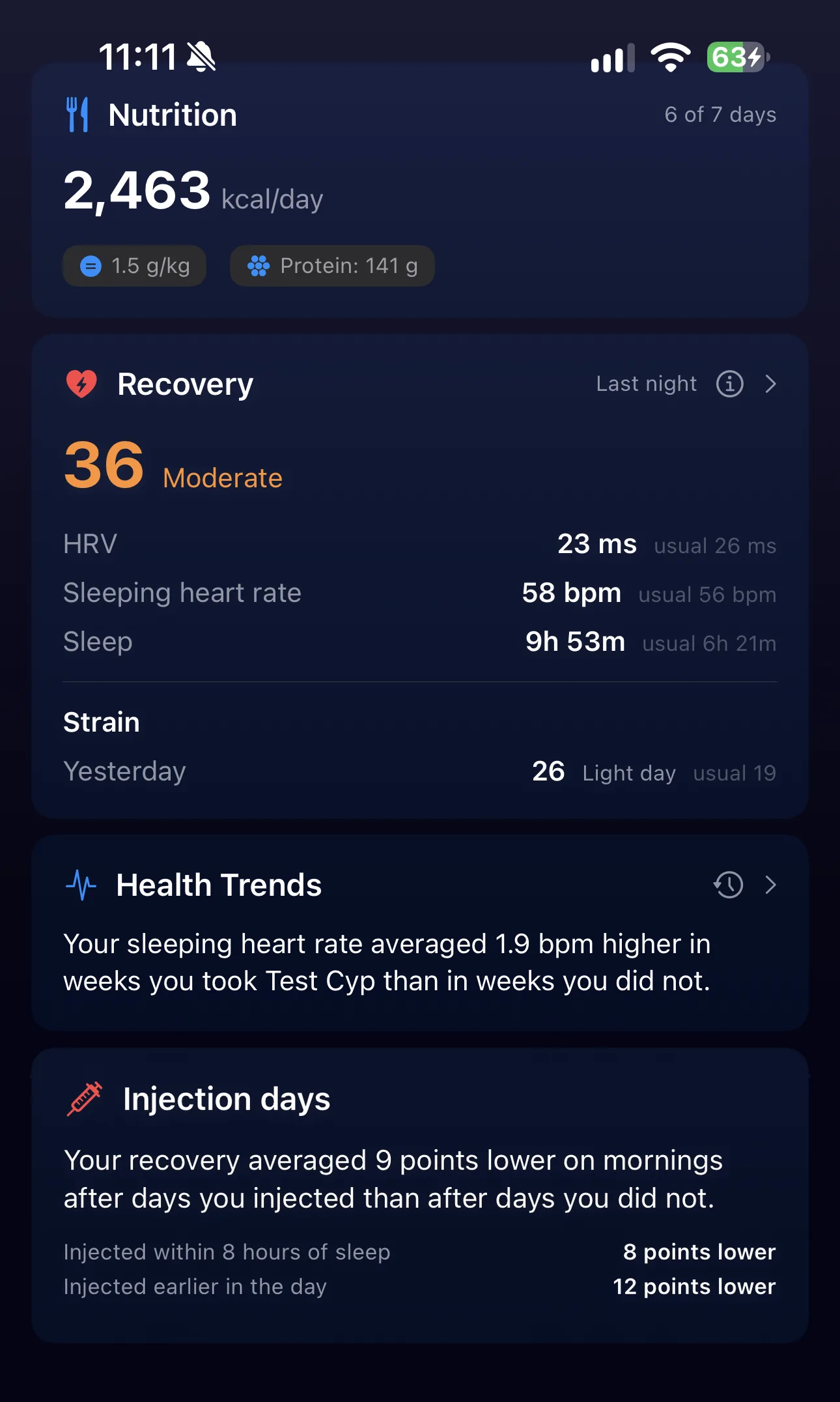
Each morning, a score from 0 to 100 for last night: your HRV, your heart rate while asleep and how long you slept, measured against your own last 60 nights. 50 is a typical night for you, not for an average person. It takes 14 nights to learn your baseline.
Strain
Your heart rate load while awake, from 0 to 100. Time close to your maximum heart rate counts for far more than easy movement. A day your watch barely saw is left unscored instead of being read as a rest day.
Health Trends card
The most useful thing your own data says right now, on the Overview: a lab marker leaving its range, or a clear link between a compound and your sleep or HRV. Every finding goes into a log you can scroll back through.
Injection days
Your recovery on mornings after days you injected, compared with mornings after days you did not. It is split by whether you injected within 8 hours of sleep or earlier in the day.
Protocol weeks
Your HRV and sleeping heart rate in weeks on a compound against weeks off it, with slow drift over the year removed first. It needs 4 weeks on and 4 weeks off a compound.
Large dose changes
Start, stop or change a dose by 50% or more and OptiPin watches the next six weeks. Then it compares them with your other six-week stretches, so “no clear difference” means something too.
Calories and sleep
Log meals in any app that writes to Apple Health and your sleeping heart rate is compared against evening and whole-day calories.
Which wearables work
Built and tested on Apple Watch. Whoop, Oura, Garmin and other wearables that write sleep and heart rate to Apple Health are read from what they share. Whoop shares no HRV or all-day heart rate with Health, so for Whoop the score uses sleeping heart rate and sleep, with no strain.
How much to trust it
Every comparison adjusts for the day of the week and how hard you trained the day before. A finding appears only once it beats what your own history does by chance. It is worded as something that went together, never as a cause. When a comparison has nothing to show, the “What’s taken into account” panel says why: not enough mornings yet, or an injection that always falls on the same weekday. Against a Whoop worn on the same nights, the score read the same direction on 8 nights in 10. That was tested on one person’s data, so read it as a guide to your own trends and not as a medical measurement.
📓 Daily Check-in & Symptom Tracking
The signal-to-noise ratio that surfaces protocol patterns.
Daily mood / sleep / libido / energy
Turn “I think it’s working” into proof – capture how you actually feel in 30 seconds a day, sliders plus notes.
Custom trackers
Track whatever matters to you – skin clarity, joint pain, morning wood – as a number, scale, or yes/no.
Suggested trackers
Get recommendations on what to track – drawn from the benefits and side effects most commonly reported for the compounds in your own stack.
Side-effect logging
Catch side effects early by tagging them per dose – nausea, headache, site reactions, water retention, mood shifts.
Tag system
Tag any log your own way, then filter and analyze by the patterns you care about.
📊 Protocol Insights
Patterns you'd never spot from staring at individual charts.
Weekly digest
Get the story of your week in plain language – your doses, check-ins, weight, and labs in one read instead of ten charts.
Month-in-review
See the bigger arc each month – what improved, what plateaued, and what to raise at your next clinic visit.
Pattern detection
Catch correlations you’d never spot yourself – a Friday slump on weekly TRT, a GLP-1 nausea window, a marker creeping toward its action threshold.
Selectable perspectives
Hear it your way – clinical, motivational, plain-language, or bodybuilder coach.
Deep Bloodwork analysis
Go deep on your labs with a focused, citation-grounded read of your trends.
Feedback loop
Thumbs-up what’s useful and your summaries get sharper over time.
Included with Premium
OptiPin reads your whole picture – medications, doses, bloodwork, Apple Health metrics, and daily check-ins – and turns it into plain-language observations you can act on or bring to your next clinic visit. It's part of the OptiPin Premium subscription: subscribe in the app and run an analysis right from the Analyze tab. Insights and observations, not medical advice.
Download on the App StoreInventory & Reorder
Vial inventory you never have to think about until you need to.
“Tells you when to reorder based on your stock. Titration, cycle length, everything is there. 10/10 would recommend.”
Per-compound inventory
Always know how much you have left – open dates, doses remaining, and discard windows tracked per vial.
Discard alerts
Never inject an expired vial – you’re warned based on each compound’s stability window (~28 days for most reconstituted GLP-1s, ~30 for GH peptides, longer for TRT).
Reorder reminders
Never run out mid-protocol – get an alert when supply drops below the threshold you set.
Cost-per-dose calculator
See what each shot really costs – vial size, dilution, dose, and discard windows all factored in.
Multi-vial tracking
Start a fresh bottle without recreating anything – keep logging to the same medication and your inventory just updates.
Mixed vial sizes
Stock different vial sizes (say a 5 mg and a 15 mg) and each is tracked on its own instead of averaged – with a heads-up when the one you’re using runs low, so you reorder the right one.
Analysis & Charts
See what your protocol is actually doing to you, in plain charts.
Hormone history charts
Watch testosterone, DHT, E2, and GLP-1 move over time, with your doses marked right on the curve.
Weight trend
Follow scale weight, body fat, and lean-mass proxies in one place (pulled from Apple Health when available).
Medication impact view
See whether a medication is earning its place – its correlated effect on mood, sleep, libido, weight, and labs.
Monthly summary view
Step back month by month, with cycle phase in context.
Cycle phase tracking
Running on/off cycles? Mark the phase boundaries so your trends are read in the right context.
💾 Backup & Restore
Lose your phone and lose nothing – your data is backed up and yours to take anywhere.
Automatic iCloud backup
A daily safety net – your protocol, doses, schedules, inventory, and check-ins snapshotted automatically.
Local backup files
Keep your own copy – export to a file you can store anywhere, even outside iCloud.
Cross-device sync
Pick up on another device via iCloud when you enable it.
Safe restore
Restore without losing data – it cleanly handles missing parents, ID collisions, and orphaned records.
Audit log
See exactly what happened to your data – every backup, restore, and migration is logged.
Privacy & Data
The non-negotiable foundation.
On-device by default
Your health data stays on your phone – no server, no account, nothing to leak.
No account / no login
Start tracking the moment you open the app – no email, no password, no identity to hand over.
Optional iCloud backup
If you turn on backup, it’s end-to-end encrypted through iCloud – even Apple can’t read it.
No third-party data sharing
Nothing is sold or shared – your protocol, doses, labs, and check-ins never leave your device unless you export them.
Anonymous analytics
Even crash and usage analytics are anonymous – device-generated IDs only, never tied to you.
💵 Pricing
Every new install starts with a 14-day full trial – no account, no card. After that, one medication stays free forever.
Free
$0
1 medication, forever. Forecast curve. No card, no account.
Premium Monthly
$4.99 /mo
Unlimited compounds and all Premium features. Cancel anytime.
Premium Annual
$39.99 /yr
Best value – unlimited compounds, estimated levels, protocol insights, Apple Health bloodwork, inventory, full charts. Saves 33% vs monthly.
USD prices on the US App Store; pricing varies by region.
🚧 Coming Soon
Tracking what's actively being built (subject to change).
Home screen widgets
Small + medium sizes showing upcoming doses and current estimated levels.
Swipe-to-log return
Was removed when groups shipped (gesture conflict); redesign in progress.
New-vial flow
A dedicated reset for vial tracking when starting a fresh bottle of an existing medication.

Try OptiPin Free
Every install starts with a 14-day full trial – everything unlocked, no account, no card. After that, one medication stays free forever; Premium is $4.99/mo or $39.99/yr.
Download on the App Store