 OptiPin
How the recovery score is built
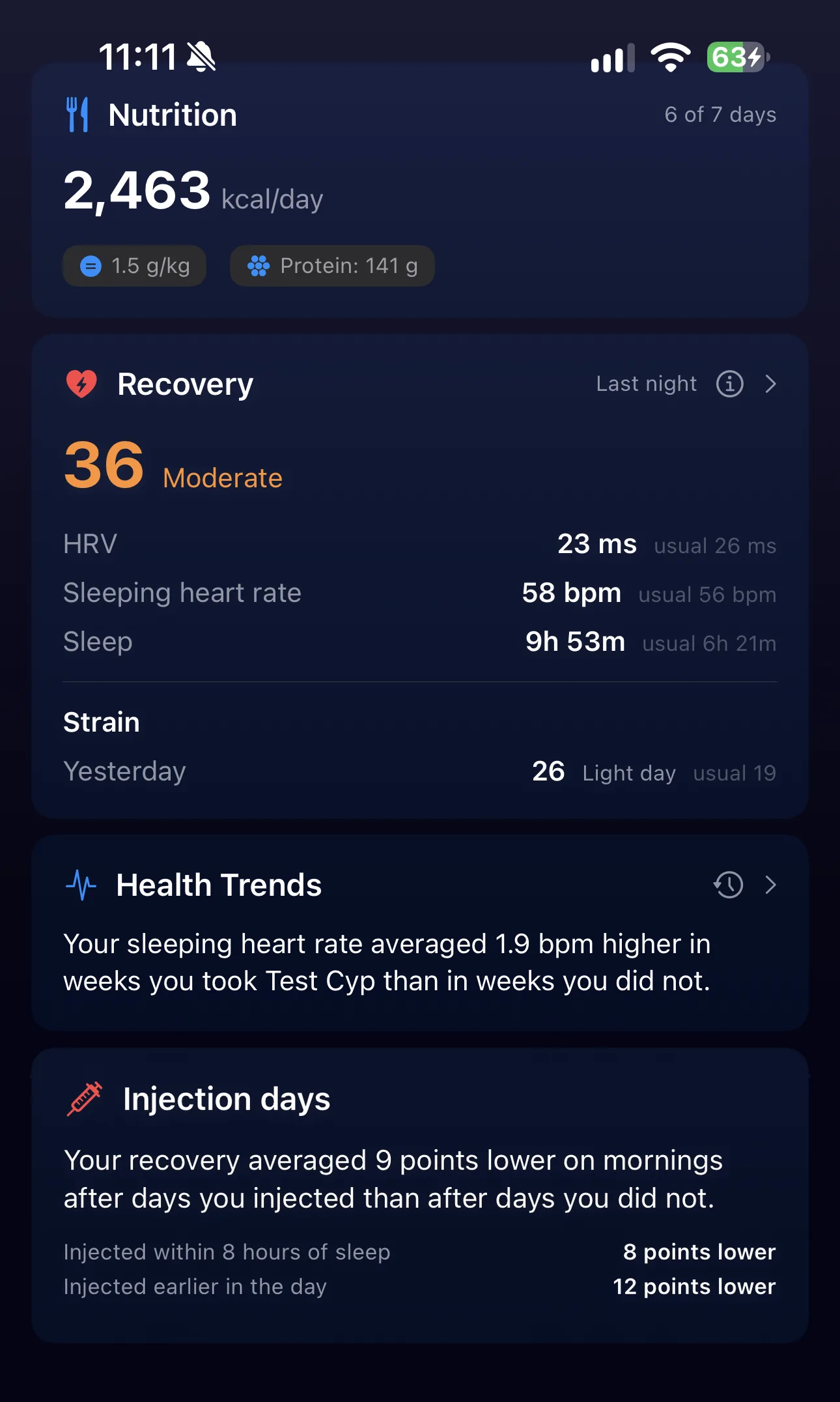
Each night gets three inputs from Apple Health: heart rate variability (read from the beat-to-beat series your watch records while you sleep), heart rate while asleep (only the samples inside your sleep stages) and time asleep.
Each input is compared with your own last 60 nights, taken from the last 90 days. OptiPin uses the median and the typical spread of those nights instead of an average, so one terrible night does not move your baseline. Higher HRV counts in your favor. A lower sleeping heart rate counts in your favor. Extra sleep earns a little. Short sleep costs in full.
The three are weighted 50% HRV, 30% sleeping heart rate and 20% sleep, then placed against your own history of nights. That is why 50 means a typical night for you, whatever your absolute numbers are. A 35-year-old with an HRV of 80 ms and a 55-year-old with 25 ms can both score 50 on an ordinary night.
Scores under 25 read as Low, 25 to 59 as Moderate and 60 or more as High. On the nights the score was tuned on, that split came out at roughly 19%, 46% and 36%.
If your wrist temperature or breathing rate is well above your usual and your HRV or heart rate agrees, the score is capped in the Low band and the card says why. A raised temperature or breathing rate can come with illness, so those nights are also kept out of your baseline.
It takes 14 nights to learn your baseline. Until then the card shows how many nights it has.
How strain is built
Strain adds up how hard your heart worked while you were awake. Each heart rate reading is placed between your resting rate (your median sleeping heart rate over the last 30 nights) and your maximum (estimated from your age, or your own highest reading if that is higher). Time near the top counts far more than time near the bottom. Readings under 30% of that range are ignored so a day of walking around does not pile up. The total is scaled from 0 to 100.
A day your watch saw for less than 60% of your waking hours is not scored. A watch left on the charger otherwise reads as an easy day.
Strain is shown beside recovery but does not feed it. A hard day already shows up in the next night’s heart rate and HRV.
What Health Trends compares
Health Trends is the card that reads your wearable data against your protocol. It runs four comparisons over your whole history:
Injection days
Your recovery on mornings after days you injected, against mornings after days you did not. It is split by whether you injected within 8 hours of sleep or earlier in the day. A compound you take almost every day is set aside, because there are no injection-free days to compare it with.
Protocol weeks
Your average HRV and sleeping heart rate in weeks on a compound against weeks off it, with slow drift over the year removed first. It needs at least 4 weeks on and 4 weeks off, so it suits cycled peptides and blast-and-cruise protocols best.
Large dose changes
Start, stop or change a dose by 50% or more and OptiPin watches the six weeks after it. The card says “watching” until those weeks have passed. Then it ranks the change against your other six-week stretches, so you can see whether it was bigger than your usual week-to-week swing.
Calories and sleep
If you log meals in an app that writes to Apple Health, your sleeping heart rate is compared against evening and whole-day calories.
The same card also carries bloodwork findings, such as a marker leaving its range between two draws. Every finding goes into a log you can scroll back through.
How it avoids finding patterns that are not there
Correlate enough things and something will always look significant. These are the rules that stop the card reporting noise:
Known causes are removed first. Every comparison adjusts for the day of the week and for how hard you trained the day before. On the data the method was built on, the raw injection-day gap was twice the adjusted one: the injections fell on Saturdays and after hard training days.
Your own history is the test. A difference counts only when it is larger than what your own data produces by chance. OptiPin checks this by shuffling your own weeks and mornings many times over, not by assuming a textbook distribution.
The difference has to be worth saying. A finding also needs HRV to move by at least 5%, sleeping heart rate by at least 1 bpm or recovery by at least 3 points. A long history cannot turn a trivial difference into a headline.
Two levels of confidence. A clear finding passes the standard statistical bar after correcting for testing several compounds at once. A likely finding is labeled as a lean, with how often chance alone would produce it.
“Could not test” is never shown as “nothing found”. The “What’s taken into account” panel lists each comparison with its status: needs more mornings, cannot be told apart from a weekday, no clear difference yet, or shown above.
Association only. Every sentence is written with the measurement as the subject: “Your sleeping heart rate averaged 1.9 bpm higher in weeks you took Test Cyp than in weeks you did not.” It never says a compound caused anything. It never suggests a dose.
How it was tested
The method was tuned on one person’s data: 424 nights with an Apple Watch and a Whoop worn together. Against the Whoop’s own numbers on the same nights:
- sleeping heart rate from the Watch correlated with Whoop’s resting heart rate at 0.95
- HRV from the Watch’s beat series correlated with Whoop’s HRV at 0.75 (Apple’s own daily HRV figure managed 0.56)
- the recovery score correlated with Whoop’s recovery at 0.78
- strain correlated with Whoop’s day strain at 0.88
So the score moves with Whoop’s, but it is not the same number and it will not match day to day. More important, this is one person. That is why the app asks, under a scored night, whether the score matches how you feel. Those answers are the only way to check it against more people.
Which wearables work
Apple Watch gives every input: HRV, sleeping heart rate, sleep and all-day heart rate for strain.
Oura, Garmin, AutoSleep and others that write sleep and heart rate to Apple Health are read from what they share. Oura writes a different HRV measure, which OptiPin uses as a stand-in. That has not been tested against a real Oura.
Whoop shares sleep and resting heart rate with Apple Health but no HRV and no all-day heart rate. For Whoop, the score uses sleeping heart rate and sleep only, with no strain. Against Whoop’s own recovery that version agreed at 0.71.
OptiPin reads one source at a time and never mixes two devices in one baseline.
Where the data goes
Nowhere. OptiPin reads Apple Health on your iPhone with your permission, scores the nights on your iPhone and keeps them in a local cache that is not included in backups. There is no OptiPin account and no server that sees your nights.
Frequently asked questions
Can I get a recovery score without a Whoop?
Yes. OptiPin scores recovery from Apple Watch data alone: HRV, heart rate while asleep and sleep, against your own last 60 nights. Tested on one person’s nights, it correlated with Whoop’s recovery at 0.78.
Does testosterone or a peptide affect my HRV?
It can differ from person to person, which is the point of reading your own data. OptiPin compares your HRV and sleeping heart rate in weeks on a compound against weeks off it. It also compares your recovery on mornings after injection days. It reports what went together in your data. It cannot say why.
How long before Health Trends shows anything?
The recovery score needs 14 nights. Injection-day comparisons need enough mornings both after injections and without them. Protocol weeks need at least 4 weeks on and 4 weeks off a compound. Until then the “What’s taken into account” panel says what each one is waiting for.
Should I change my dose based on my recovery score?
No. The score summarizes your nights and the findings describe associations in your own data. Bring them to your prescriber alongside your bloodwork if they seem relevant. Protocol decisions are made with them.